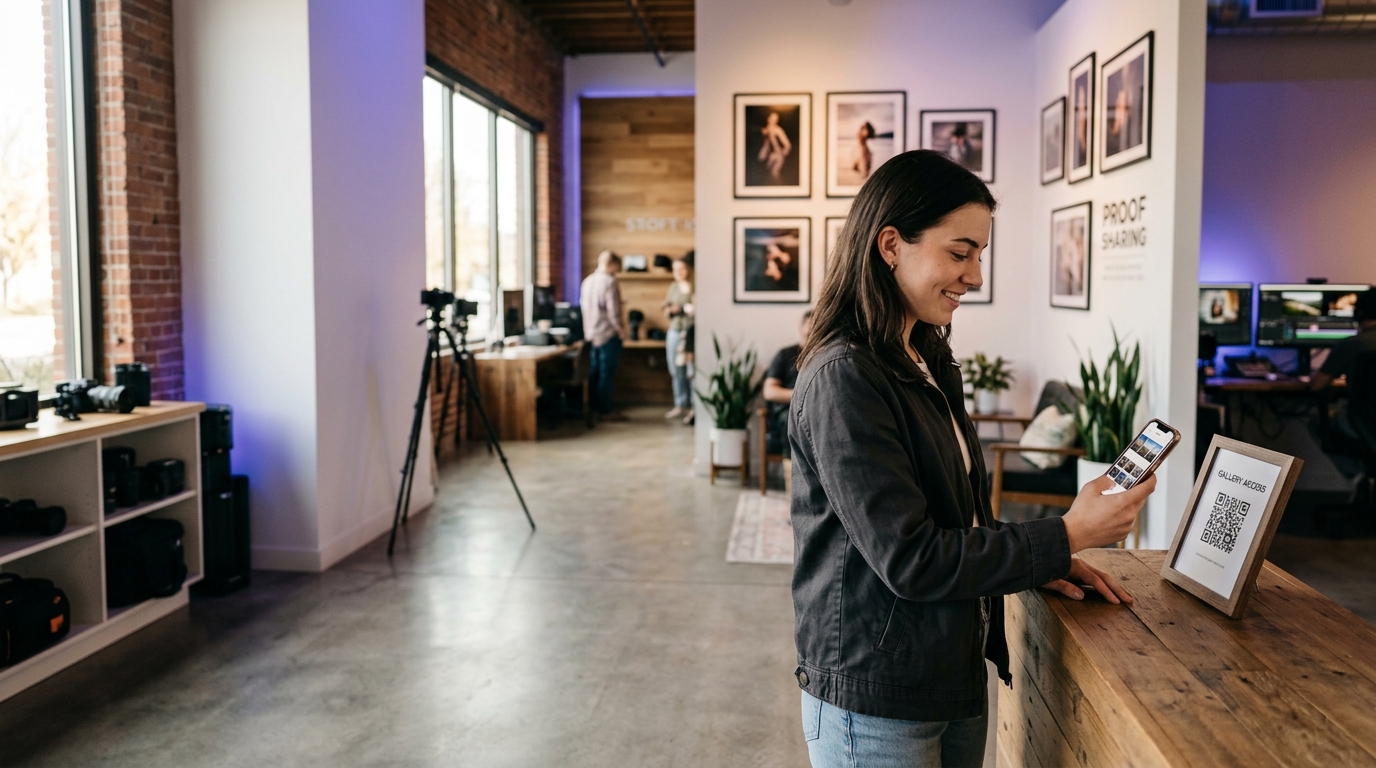
QR Codes for Photographers & Videographers
Photographers and videographers use QR codes to share proofs instantly, link business cards to their portfolio, and let clients book sessions without a single email exchange.
Create your free QR code →Free trial · No credit card · Codes never expire
What you can do with QR codes in Photographers and Videographers
The most common uses are:
Every QRecode code is dynamic — you can change where it points at any time without reprinting, and every scan is tracked.
Delivering galleries to clients with a QR code
The most common use for a photographer is handing over a gallery. A code on a print, a thank-you card, an album box or a USB sleeve opens the client’s own gallery without them digging out an email from three weeks ago.
Because a dynamic code can be re-pointed, a single printed card design works for every client: you print one batch, and each card’s code is assigned to that client’s gallery when you hand it over. When the gallery expires or moves host, you update the destination rather than reprinting.
It also solves the quiet problem of gallery links being long, ugly and impossible to read aloud. A code removes the transcription entirely.
- Point the code at the gallery itself, not your homepage — a client with a card in their hand will not navigate.
- Use a dynamic code so you can move hosts or refresh an expired gallery without the card becoming dead.
- On a print or album, keep the code on the reverse or the packaging rather than the image face.
- Track scans to see whether clients actually open galleries — a low scan rate usually means the handover moment needs explaining, not a better gallery.
Codes on prints, albums and packaging
Photographic surfaces are unforgiving. Glossy and metallic papers throw a reflection straight back at a phone, lustre and matte surfaces are far more reliable, and a code printed onto textured fine-art stock needs to be larger because the surface breaks up the module edges.
Print the code on the packaging, mount board, or reverse where you can, rather than on the photographic paper itself. If it has to sit on the print, place it in a low-detail area and keep a clear margin around it — a code overlapping busy image detail loses the contrast a scanner needs to find the finder patterns.
| Surface | Practical minimum | Notes |
|---|---|---|
| Matte or lustre paper | 2cm | Most reliable photographic surface |
| Gloss or metallic paper | 2.5cm | Reflects badly; avoid if possible |
| Textured fine-art stock | 2.5–3cm | Surface breaks up module edges |
| Album or box packaging | 2.5cm | Best option — controlled surface |
| Thank-you or business card | 2cm | Read in the hand |
Codes at shoots, exhibitions and markets
At a wedding or event, a code on a table card lets guests reach a shared upload folder or the public gallery, which is a straightforward way to collect guest photographs and to put your work in front of everyone in the room.
At an exhibition or market stall, a code beside a framed piece can carry the story behind the image, print sizes and prices, or a direct purchase link. This is where scan tracking earns its keep: it tells you which pieces people wanted to know more about, which is a different and more useful signal than which ones drew a glance.
A real, working QR code
This code was generated on this page, in your browser. Point your phone camera at it and it opens this guide — every code the generator makes works the same way.
Create yours freeHow to create a QR code
From idea to scannable code in three simple steps.
Create your code
Choose what your code links to — a website, menu, booking page, contact card or more. Customise the colours to match your brand.
Add it to your materials
Download a print-ready PNG or SVG and add it wherever your customers will see it. SVG stays sharp at any size.
Track and update
Watch scans roll in through real-time analytics, and change where your code points any time — no reprinting needed.
Why use dynamic QR codes?
Unlike static QR codes, dynamic codes let you change where they point any time — without reprinting. Track every scan with real-time analytics, customise the design to match your brand, and download in print-ready SVG or PNG.
- Share proof galleries instantly from your business card
- Update your portfolio link without reprinting cards
- Book clients directly from a flyer or print ad
Change where your code points without reprinting.
See every scan, device, and location instantly.
Match your brand colours and add a logo overlay.
Print-ready quality at any size.
UK-hosted, privacy-first scan tracking.
Your printed materials work forever.
Dynamic vs static QR codes
Not sure which to use? Here's how they compare.
Practical tips
A client holding a card will not navigate. Send them where they expect to land.
Packaging, mount board or the reverse. Gloss and metallic papers reflect badly and busy image detail kills contrast.
A dynamic code lets a single printed batch serve every client, and survives a gallery moving host.